# Portal de gestión online

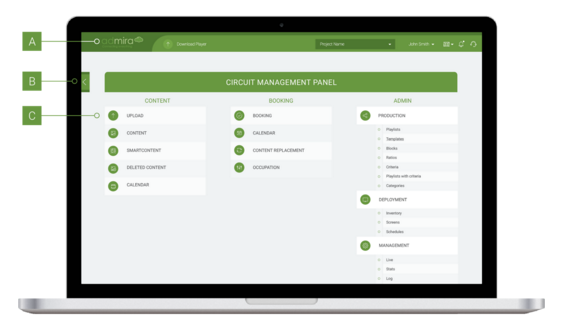
Cuando iniciemos sesión en [new.admira.mobi](http://new.admira.mobi/) nos encontraremos con esta pantalla:

<figure><img src="/files/7iXcijk0e41iBDDsIW0h" alt=""><figcaption><p>Portal de gestión online</p></figcaption></figure>

Explicaremos los diferentes elementos en este cuadro resumen:

<table data-header-hidden><thead><tr><th width="112.33333333333331"></th><th width="179"></th><th></th></tr></thead><tbody><tr><td>Índice</td><td>Función</td><td>Descripción</td></tr><tr><td>A</td><td>Logotipo</td><td>“Atajo” a la página inicial (Home, la de arriba)</td></tr><tr><td>B</td><td>Menú de pestañas</td><td>Permite al usuario navegar a través de los contenidos que figuran en la Vista General</td></tr><tr><td>C</td><td>Home</td><td>Vista global de todas las especificaciones y funcionalidades de Admira</td></tr></tbody></table>


---

# Agent Instructions: Querying This Documentation

If you need additional information that is not directly available in this page, you can query the documentation dynamically by asking a question.

Perform an HTTP GET request on the current page URL with the `ask` query parameter:

```
GET https://docs.admira.com/conocimientos-basicos/portal-de-gestion-online.md?ask=<question>
```

The question should be specific, self-contained, and written in natural language.
The response will contain a direct answer to the question and relevant excerpts and sources from the documentation.

Use this mechanism when the answer is not explicitly present in the current page, you need clarification or additional context, or you want to retrieve related documentation sections.
