# Contenidos eliminados

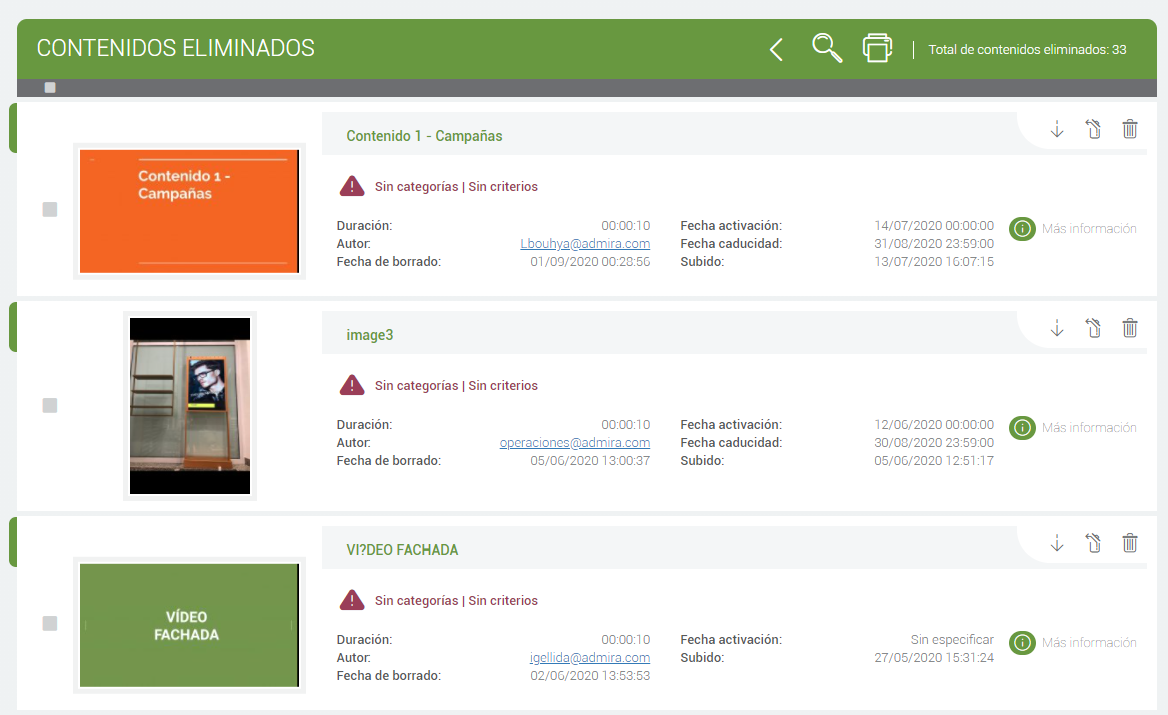
En esta sección podemos ver todos los contenidos que han sido eliminados o caducados.

<figure><img src="/files/YELO5UjLHUw4dmis6KVC" alt="" width="563"><figcaption><p>Contenidos eliminados</p></figcaption></figure>

Podemos ver:

* Fechas de activación y de caducidad
* Fecha de subida del contenido
* Ver los criterios y categorías que tenía antes de quedar eliminado o caducado

<figure><img src="/files/3x2cVytsaGoHGPmJYffr" alt=""><figcaption><p>Información del contenido</p></figcaption></figure>

Podremos hacer:

* Descargarnos el contenido
* Recuperar el contenido
* Eliminar el contenido **para siempre**
<figure><img src="/files/0e3HfQZfLco9MpyUKrE5" alt=""><figcaption><p>Información del contenido</p></figcaption></figure>


---

# Agent Instructions: Querying This Documentation

If you need additional information that is not directly available in this page, you can query the documentation dynamically by asking a question.

Perform an HTTP GET request on the current page URL with the `ask` query parameter:

```
GET https://docs.admira.com/contenidos/contenidos-eliminados.md?ask=<question>
```

The question should be specific, self-contained, and written in natural language.
The response will contain a direct answer to the question and relevant excerpts and sources from the documentation.

Use this mechanism when the answer is not explicitly present in the current page, you need clarification or additional context, or you want to retrieve related documentation sections.

